๐Ÿงถ Beautiful โœจ Detailed ๐Ÿ’ Adorable

Squid Minecraft Character Amigurumi Pattern

Squid Minecraft Character Amigurumi Pattern
4.0โ˜… Rating
4-5 Hours Time Needed
1.6K Made This
โœ‚๏ธ

Beginner Friendly Level

Perfect for those just starting their sewing journey, with clear instructions and simple techniques

โฑ๏ธ

Weekend Treat

Takes 5-7 hours, making it an enjoyable project to finish over a couple of days.

๐Ÿฆ‘

Charming Critter

Delightful animal designs with sweet details that capture the essence of your favorite woodland and farmyard friends.

About This Squid Minecraft Character Amigurumi Pattern

This Squid amigurumi pattern brings Minecraft's quirky ocean mob to life with striking black and red color blocking! Using primarily black yarn with a vibrant red base section, you'll create the signature cubic body with color transition techniques. The pattern teaches simple color changing, cube-shaping with corner markers, and repetitive construction of twelve identical thin tentacles that create wonderful flowing movement and authentic squid appearance when complete.
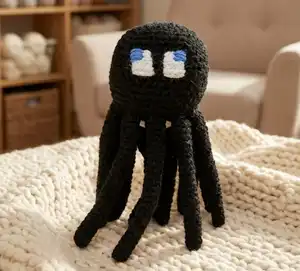
Squid Minecraft Character Amigurumi Pattern crochet pattern - detailed view of completed project

With straightforward square body construction featuring a two-color design and twelve identical simple tube legs, this pattern is perfect for beginners who want to practice making multiple identical pieces. The embroidered face and teeth details add personality without complex colorwork, making this an accessible yet impressive underwater project.

Why You'll Love This Squid Minecraft Character Amigurumi Pattern

I absolutely love this Squid pattern because it's such a unique character with those twelve dangling tentacles that give it so much personality and movement! There's something incredibly satisfying about the color transition from red to black - it creates such a bold, graphic look that really pops. I find making the twelve tentacles wonderfully meditative - the repetition is soothing, and you can really perfect your technique by the time you finish the last one. I especially love how the tentacles remain unstuffed and flexible, creating natural swaying movement whenever the squid is picked up or displayed. The contrast between the structured cubic body and the flowing organic tentacles is such a beautiful design element. Plus, the white teeth embroidered around the red section add that perfect touch of Minecraft quirkiness! This pattern teaches valuable skills like color changing and creating multiple identical elements while producing something genuinely eye-catching and fun.

Squid Minecraft Character Amigurumi Pattern step 1 - construction progress Squid Minecraft Character Amigurumi Pattern step 2 - assembly progress Squid Minecraft Character Amigurumi Pattern step 3 - details and accessories Squid Minecraft Character Amigurumi Pattern step 4 - final assembly and finishing

Switch Things Up

I love creating the glow squid variant from this pattern! Use teal or cyan yarn instead of black, add touches of light aqua or white for highlights, and even incorporate some sparkly metallic thread held together with the main yarn for that bioluminescent underwater glow effect. It creates such a magical, ethereal appearance!

For the tentacles, I sometimes vary the lengths by working different numbers of rounds - make some 20 rounds, some 24 rounds, and some 28 rounds for a more natural varied tentacle length appearance. You could also taper them by decreasing to 5 or 4 stitches at the tips.

I've successfully made a giant squid using worsted weight yarn and a 5mm hook, creating an impressive piece with tentacles that are 8-10 inches long - it looks amazing hanging from the ceiling as room decor! For mini versions, use sport weight yarn and a 2.5mm hook for adorable desk companions.

Try adding small suction cup details to the tentacles by embroidering tiny white or grey circles along the length - it adds wonderful detail and authenticity. Some crafters also add subtle shading by working with two strands held together in slightly different black tones for dimension.

For a fun ocean scene, create multiple squids with different colored variants and display them together with other ocean mobs like guardians and fish. You could also make tiny ink sac accessories from small black spheres that can be positioned near the squid as if it just released them!

Common Mistakes & How to Fix Them

โœ— Changing from red to black yarn at the wrong round which throws off the proportions and creates asymmetrical color blocking โœ— Spacing the twelve tentacles unevenly around the bottom perimeter causing bunching in some areas and gaps in others โœ— Stuffing the thin tentacle legs which makes them stiff and unnatural instead of flowing and flexible with movement โœ— Not maintaining proper corner marker placement with 9 stitches between each pair resulting in warped cube shape instead of square
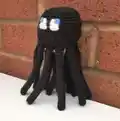
Squid Minecraft Character Amigurumi Pattern

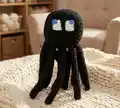
Create the unique underwater Squid from Minecraft with this distinctive amigurumi crochet pattern! This pattern features the iconic black cubic body with red accent bottom, white embroidered teeth detail, and twelve long flowing tentacle legs. Perfect for Minecraft ocean enthusiasts and underwater mob collectors, this pattern uses cube-shaping techniques with simple repetitive tentacle construction. With step-by-step instructions for the two-tone square body, twelve identical thin legs, and expressive embroidered face details, you'll craft a recognizable aquatic companion with wonderful movement and personality!

Beginner Friendly 4-5 Hours

Materials Needed for Squid Minecraft Character Amigurumi Pattern

โ€” Main Fabric

  • 01
    DK yarn in black, red, white, and blue

โ€” Tools Required

  • 01
    3.5mm crochet hook
  • 02
    Embroidery needle
  • 03
    Scissors
  • 04
    Toy stuffing
  • 05
    4 clip markers

Progress Tracker

0% Complete

โ€” Body :

Info :

Begin with red yarn

Round 1 :

8SC into a magic loop {8}

Round 2 :

(SC1, 3SC into the next ST) 4 times {16}

Round 3 :

SC2, 3SC into next ST, (SC3, 3SC into next ST) 3 times, SC1 {24}

Round 4 :

SC3, 3SC into next ST, (SC5, 3SC into next ST) 3 times, SC2 {32}

Info :

Change to black yarn

Round 5 :

SC4, 3SC into next ST, (SC7, 3SC into next ST) 3 times, SC3 {40}

Round 6-18 :

SC around {40}

Info :

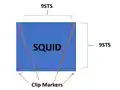
Add clip marker into 4 corners where decreases will be, with 9 stitches between every 2 stitches

Round 19 :

(SC to stitch before marker SC3TOG) 4 times, SC to end {32}

Round 20 :

(SC to stitch before marker SC3TOG) 4 times, SC to end {24}

Round 21 :

(SC to stitch before marker SC3TOG) 4 times, SC to end {16}

Info :

Stuff head

Round 22 :

(SC to stitch before marker SC3TOG) 4 times, SC to end, remove markers {8}

Info :

Join and FO. With yarn tail pick up front loop only of remaining 8 stitches in order, pull tight to close. With white yarn sew teeth detail around red part of Squid

โ€” Legs :

Info :

Make 12 with black yarn

Round 1 :

CH2, 6SC into the 2nd CH from hook {6}

Round 2-24 :

SC around {6}

Info :

Join and FO. Sew 3 legs onto bottom of each side of squid

โ€” Face Detail :

Info :

With white and blue yarn sew on Squid's face details. Sew shape first, then fill in with colour

Assembly Instructions

  • Ensure cubic body is stuffed firmly before closing to maintain square Minecraft shape characteristic of squids
  • Embroider white teeth detail around the red bottom section using small vertical straight stitches for pixelated appearance
  • Attach twelve black tentacle legs evenly around the bottom perimeter distributing them equally on all four sides
  • Position three legs on each of the four sides of the square bottom for balanced symmetrical appearance
  • Leave tentacles unstuffed or very lightly stuffed so they remain flexible and flow naturally with movement
  • Embroider face details on the black portion using white for eyes and blue for pupils in square shapes
  • Position facial features on one side of the black section designating it as the front face of the squid

Important Notes

  • ๐Ÿ’กChange from red to black yarn at Round 5 for proper color proportions - red base and black upper body
  • ๐Ÿ’กAll twelve legs are identical so use the first one as your template for consistent sizing throughout
  • ๐Ÿ’กLeave tentacles unstuffed for natural flowing movement - stuffing them makes them stiff and unnatural looking
  • ๐Ÿ’กDistribute legs evenly with three on each of the four sides of the cube bottom for balanced appearance
  • ๐Ÿ’กPlace four corner markers carefully with exactly 9 stitches between each pair for perfect cube shaping
  • ๐Ÿ’กEmbroider white teeth around the red section using vertical stitches that look like small rectangular blocks
  • ๐Ÿ’กWork in good lighting when crocheting with black yarn as stitches can be difficult to see clearly

This striking Squid amigurumi pattern brings Minecraft's quirky ocean mob to life with bold black and red color blocking! With simple cube construction, twelve flowing tentacles, and charming embroidered details, this pattern is perfect for beginners wanting to practice repetitive elements and color changes. The dangling legs add wonderful movement creating an eye-catching underwater companion! ๐Ÿฆ‘๐Ÿ–ค Happy crocheting! โœจ

You ask,

we answer.

FAQs

Should I stuff the tentacle legs?

No! Leave them completely unstuffed or only very lightly stuffed at the base. Unstuffed tentacles hang naturally and sway with movement, which looks much more realistic and squid-like than stiff stuffed tubes.

How do I distribute twelve legs evenly?

Think of the square bottom as having four sides. Place three legs evenly spaced on each side (12 total). Pin all twelve in place before sewing to check spacing and make adjustments for balanced distribution.

When exactly do I change from red to black?

Change colors at the beginning of Round 5, right after completing Round 4 in red. This creates the proper proportion with red forming the base/bottom section and black forming the larger upper body section.

How do I make the teeth look pixelated?

Use white yarn to create small vertical straight stitches around the transition line between red and black. Make them look like small rectangles arranged in a row, mimicking Minecraft's blocky aesthetic for the teeth detail.

Can I make a glow squid variant?

Absolutely! Minecraft added glow squids in recent updates. Use teal or cyan yarn for the body with lighter aqua accents, and consider adding some sparkle or metallic thread mixed in for that bioluminescent glowing effect.